Measuring data throughput of get_next_line
Measuring data throughput of get_next_line
NOTE: This post is primarily for 42 students, since they have probably written their implementation of get_next_line already.
The important fact is that for 42 projects you are not allowed to find out the size of your file with any external function (such as ‘stat’ on Linux). To read and write to a file you are allowed to use read and write functions provided by the unistd.h.
The get_next_line function should return the next line from a file each time it is called.
Reading from a file with unknown size
Since we do not know the size of the file it is a logical approach to read the file by chunks until the end of the file.
In this article, I would like to figure out the ideal size of those chunks, in our case, BUFFER_SIZE macro defines the size of one chunk. So whenever we call our read it will look like this:
read_bytes = read(fd, buffer, BUFFER_SIZE);
In theory, with file size of TOTAL_SIZE and buffer size of BUFFER_SIZE, the read should
be called N + 1 times, where
N = TOTAL_SIZE / BUFFER_SIZE - the extra call is for the case where we will return an empty string after reaching end of the file.
To support this statement, let’s test it my main loop that looks like this:
t_arena_temp temp = temp_begin(arena);
t_string line = get_next_line_from_fd(&ctx);
while (line.size)
{
    // write(STDOUT_FILENO, line.str, line.size);
    temp_end(temp);
    line = get_next_line_from_fd(&ctx);
}
temp_end(temp);
ASIDE:
Short description of my get_next_line implementation: when it comes to memory managment, I am using arena allocator, when it comes to string processing I am operating with t_string structs only - they group the pointer to the string and the size/length of that string. The source code for this function is at the very end of this article.
Let’s count how many times read function will be called:
$ gcc -Wall -Wextra -DBUFFER_SIZE=4096 -DENABLE_PROFILER=1 main.c
$ ./a.out test_files/test_100.txt
filename: test_files/test_100.txt
size: 52428800 bytes

--- PROFILING RESULTS ---
Total time: 63 milliseconds (CPU freq: 3193934535)
read_in_gnl         : 39005952     cycles [19.18%] | No children blocks  | Hits 12801
get_next_line_loop       : 203198528    cycles [99.92%] | Exclusive: [80.74%] | Hits 1
-------------------------
We get 12801 hits for our read - that specifies how many times this function has been called.
4096 bytes is of BUFFER_SIZE and 52428800 bytes is the size of our file
52428800 / 4096 = 12800 … 12800 + 1 = 12801.
The profiling results also capture the time spent in the read_in_gnl block - 19.18%.
We can see that we get a decent performance penalty for our call to read.
A person would predict that reading the same file, but with smaller BUFFER_SIZE, will get us more hits for the read function, therefore getting bigger penalty and bigger relative time spent in the read_in_gnl block. Lets decrease our BUFFER_SIZE to 1024 and then to 64, let’s see what happens:
$ gcc -Wall -Wextra -DBUFFER_SIZE=1024 -DENABLE_PROFILER=1 main.c
$ ./a.out test_files/test_100.txt
filename: test_files/test_100.txt
size: 52428800 bytes

--- PROFILING RESULTS ---
Total time: 85 milliseconds (CPU freq: 3193953279)
read_in_gnl         : 110509184    cycles [40.64%] | No children blocks  | Hits 51201
get_next_line       : 271725472    cycles [99.92%] | Exclusive: [59.28%] | Hits 1
-------------------------
Ouch, 40.64%! Let’s decrease the BUFFER_SIZE even more:
$ gcc -Wall -Wextra -DBUFFER_SIZE=64 -DENABLE_PROFILER=1 main.c
$ ./a.out test_files/test_100.txt
filename: test_files/test_100.txt
size: 52428800 bytes

--- PROFILING RESULTS ---
Total time: 518 milliseconds (CPU freq: 3193957727)
read_in_gnl         : 1450925024   cycles [87.58%] | No children blocks  | Hits 819201
get_next_line       : 1656475264   cycles [99.99%] | Exclusive: [12.41%] | Hits 1
-------------------------
Now 87.58%!
Alright, we can clearly see a pattern. We want to have as few read calls as possible to read the entire file quicker. That would mean to increase the BUFFER_SIZE. But by how much?
The BUFFER_SIZE we tested with is 4096. Lets increase the number:
To 16384:
$ gcc -Wall -Wextra -DBUFFER_SIZE=16384 -DENABLE_PROFILER=1 main.c
$ ./a.out test_files/test_100.txt
filename: test_files/test_100.txt
size: 52428800 bytes

--- PROFILING RESULTS ---
Total time: 55 milliseconds (CPU freq: 3193975418)
read_in_gnl         : 22001472     cycles [12.51%] | No children blocks  | Hits 3201
get_next_line       : 175700864    cycles [99.87%] | Exclusive: [87.37%] | Hits 1
-------------------------
To 65536:
$ gcc -Wall -Wextra -DBUFFER_SIZE=65536 -DENABLE_PROFILER=1 main.c
$ ./a.out test_files/test_100.txt
filename: test_files/test_100.txt
size: 52428800 bytes

--- PROFILING RESULTS ---
Total time: 54 milliseconds (CPU freq: 3193963706)
read_in_gnl         : 15507872     cycles [ 8.99%] | No children blocks  | Hits 801
get_next_line       : 172278016    cycles [99.88%] | Exclusive: [90.89%] | Hits 1
-------------------------
8.99%, much better!
The Repetition Tester
To produce more reliable test results I will test my code with a repetition tester.
Repetition tester is going to run our get_next_line_loop multiple times like this and print out results when the loop hits bigger minimum of its execution time:
$ gcc -Wall -Wextra -DBUFFER_SIZE=4096 -DENABLE_PROFILER=1 reptester/reptest_main.c
$ sudo ./a.out
---New Test Wave: get_next_line_loop test_files/test_100.txt BUFFER_SIZE=4096 ---
MIN: 195161120 (61ms)   50.000Mib at 818.285Mib/s
MIN: 191886912 (60ms)   50.000Mib at 832.247Mib/s
MIN: 190069728 (60ms)   50.000Mib at 840.204Mib/s
MIN: 184958496 (58ms)   50.000Mib at 863.423Mib/s
MIN: 184048832 (58ms)   50.000Mib at 867.690Mib/s
MIN: 181250880 (57ms)   50.000Mib at 881.085Mib/s
MIN: 179726880 (56ms)   50.000Mib at 888.556Mib/s
	MIN: 179726880 (56ms)   50.000Mib at 888.556Mib/s
	MAX: 200777056 (63ms)   50.000Mib at 795.397Mib/s
	AVG: 183045094 (57ms)   50.000Mib at 872.448Mib/s
---Testing Done.---
NOTE: the size of the file is rounded down to 50 megabytes. The real file size is the same as before.
You can read the Repetition Tester source code here.
The file format - characters per line
What if the file format changes?
Until now, we have been testing with a ~50MiB file that is called test_100.txt, the ‘100’ in its name specifies the number of character per line. Let’s introduce few more test files with the similar size, ~50MiB.
$ ls -la test_files
total 204812
drwxrwxr-x 2 omaly omaly     4096 Apr 28 20:30 .
drwxrwxr-x 7 omaly omaly     4096 Apr 30 17:59 ..
-rwxrwxr-x 1 omaly omaly 52420000 Apr 28 20:38 test_10000.txt
-rwxrwxr-x 1 omaly omaly 52428000 Apr 28 20:38 test_1000.txt
-rwxrwxr-x 1 omaly omaly 52428800 Apr 28 20:38 test_100.txt
-rwxrwxr-x 1 omaly omaly 52428800 Apr 28 20:38 test_10.txt
Now we have also files with 10, 1000 and 10000 characters per line. We should expect a big performance drop for our loop, since the get_next_line function is going to have to process more lines in total per file. Like this:
$ gcc -Wall -Wextra -DBUFFER_SIZE=4096 -DENABLE_PROFILER=1 reptester/reptest_main.c
$ sudo ./a.out
---New Test Wave: get_next_line_loop test_files/test_10.txt BUFFER_SIZE=4096 ---
MIN: 334340544 (105ms)   50.000Mib at 477.647Mib/s
MIN: 329488768 (103ms)   50.000Mib at 484.681Mib/s
MIN: 325036448 (102ms)   50.000Mib at 491.320Mib/s
MIN: 323887456 (101ms)   50.000Mib at 493.063Mib/s
MIN: 323538528 (101ms)   50.000Mib at 493.595Mib/s
	MIN: 323538528 (101ms)   50.000Mib at 493.595Mib/s
	MAX: 338943616 (106ms)   50.000Mib at 471.161Mib/s
	AVG: 328629913 (103ms)   50.000Mib at 485.947Mib/s

---New Test Wave: get_next_line_loop test_files/test_100.txt BUFFER_SIZE=4096 ---
MIN: 193031424 (60ms)   50.000Mib at 827.310Mib/s
MIN: 188605664 (59ms)   50.000Mib at 846.724Mib/s
MIN: 187684640 (59ms)   50.000Mib at 850.879Mib/s
MIN: 182856704 (57ms)   50.000Mib at 873.344Mib/s
MIN: 180464896 (57ms)   50.000Mib at 884.919Mib/s
MIN: 179265504 (56ms)   50.000Mib at 890.840Mib/s
	MIN: 179265504 (56ms)   50.000Mib at 890.840Mib/s
	MAX: 194754304 (61ms)   50.000Mib at 819.991Mib/s
	AVG: 182217046 (57ms)   50.000Mib at 876.410Mib/s

---New Test Wave: get_next_line_loop test_files/test_1000.txt BUFFER_SIZE=4096 ---
MIN: 180458304 (57ms)   50.000Mib at 884.952Mib/s
MIN: 175238176 (55ms)   50.000Mib at 911.313Mib/s
MIN: 174996896 (55ms)   50.000Mib at 912.570Mib/s
MIN: 174915616 (55ms)   50.000Mib at 912.994Mib/s
MIN: 170202016 (53ms)   50.000Mib at 938.278Mib/s
MIN: 169782688 (53ms)   50.000Mib at 940.596Mib/s
MIN: 169024128 (53ms)   50.000Mib at 944.817Mib/s
MIN: 168979520 (53ms)   50.000Mib at 945.066Mib/s
MIN: 167222688 (52ms)   50.000Mib at 954.995Mib/s
MIN: 167215104 (52ms)   50.000Mib at 955.039Mib/s
MIN: 167208320 (52ms)   50.000Mib at 955.077Mib/s
MIN: 167036960 (52ms)   50.000Mib at 956.057Mib/s
	MIN: 167036960 (52ms)   50.000Mib at 956.057Mib/s
	MAX: 180458304 (57ms)   50.000Mib at 884.952Mib/s
	AVG: 168942730 (53ms)   50.000Mib at 945.272Mib/s

---New Test Wave: get_next_line_loop test_files/test_10000.txt BUFFER_SIZE=4096 ---
MIN: 173471520 (54ms)   50.000Mib at 920.594Mib/s	| 26214400 bytes / page fault (total: 2)
MIN: 168896896 (53ms)   50.000Mib at 945.529Mib/s
MIN: 168600224 (53ms)   50.000Mib at 947.192Mib/s
MIN: 167497984 (52ms)   50.000Mib at 953.426Mib/s
MIN: 162627808 (51ms)   50.000Mib at 981.978Mib/s
MIN: 160497920 (50ms)   50.000Mib at 995.009Mib/s
	MIN: 160497920 (50ms)   50.000Mib at 995.009Mib/s
	MAX: 173471520 (54ms)   50.000Mib at 920.594Mib/s
	AVG: 161519449 (51ms)   50.000Mib at 988.716Mib/s

---Testing Done.---
I wanted to introduce more file formats after introducing the repetition tester. These tests on more file formats is done so we can see how my get_next_line function performs overall.
The ideal BUFFER_SIZE
I want to get back to our topic of increasing the size of BUFFER_SIZE. Let’s stick with the test file test_100.txt, since 100 character per line is somewhat more real-life scenario when processing a text file.
I measured the data throughput of get_next_line for the test_100.txt file with different BUFFER_SIZE values: [10, 64,128, 256, 512, 1024, 4096, 16384, 65536, 262144, 1048576].
I will add some info about my CPU for better context:
$ lscpu | grep cache
L1d cache:                               192 KiB (6 instances) // 32KiB per instance
L1i cache:                               192 KiB (6 instances) // 32KiB per instance
L2 cache:                                6 MiB (6 instances)   // 1MiB per instance
L3 cache:                                16 MiB (1 instance)   // 16Mib per instance
And here are the results from the repetition tester put into a chart:
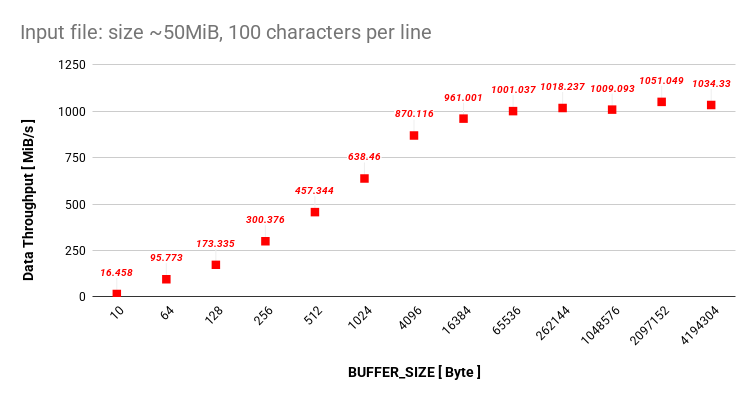
I assume that since I am setting my BUFFER_SIZE up to ~4MiB all the data can live in my L3 cache and I do not get bigger performance drops.
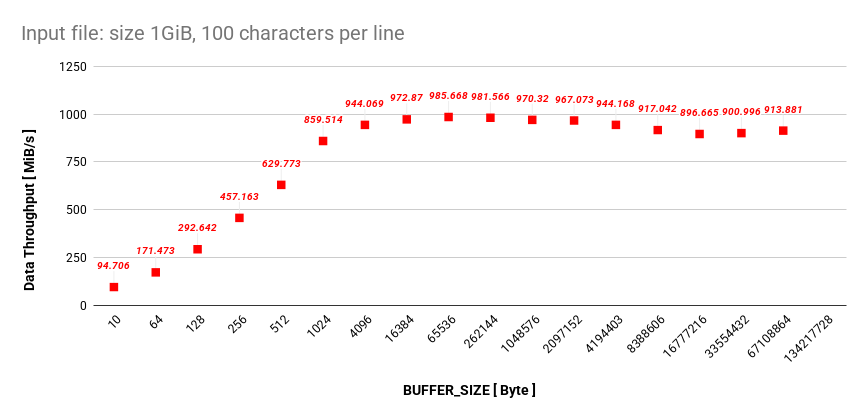
Let’s try to increase the BUFFER_SIZE even more, but we will have to create a 1GiB file.
$ ls -lha test_files/test_100.txt
-rwxrwxr-x 1 omaly omaly 1.0G Apr 30 20:01 test_files/test_100.txt
This is how it scales up to a BUFFER_SIZE with the value of 2^27.
Closing Thoughts
I was expecting bigger drop of the data throughput when we got over 16Mib, since this is my size of L3 cache. However, it did not occur. At this moment, this is enough testing for me.
After some reading done, the responsible piece of puzzle for this is probably (because I do not know) the hardware prefetcher. A hardware prefetcher is a data prefetching technique that is implemented as a hardware component in a processor. I prefer to skip this topic since I don’t understand how hardware prefetchers work.
At the very beginning of my article I was trying to figure out what is the ideal BUFFER_SIZE for my get_next_line function. So, what is the ideal BUFFER_SIZE?
Based on the data, the sweet spot sits between 4096 and 65536 bytes. At 4096 bytes, we completely escape the heavy performance penalty of the read system call. And by stopping at 65536 bytes, we ensure our data stays safely inside the L1 and L2 CPU caches.
Extra
This is how my get_next_line_from_fd function is implemented:
I left out the Arena allocator implementation.
typedef struct s_string t_string;
struct s_string
{
    char *str;
    size_t size;
};

typedef struct s_gnl_ctx t_gnl_ctx;
struct s_gnl_ctx
{
    t_arena *arena;
    int fd;
    char *buf;
    size_t buf_pos;
    size_t buf_len;
};

t_string get_next_line_from_fd(t_gnl_ctx *ctx);
ssize_t find_nl_idx_in_string(t_string s);
size_t string_concat_to_arena(t_arena *arena, t_string s);

t_string get_next_line_from_fd(t_gnl_ctx *ctx)
{
    t_string line = {.str = (char*)(ctx->arena->base + ctx->arena->offset)};
    ssize_t nl_idx = 0;
    if (ctx->buf_len != 0)
    {
        nl_idx = find_nl_idx_in_string((t_string){.str = ctx->buf + ctx->buf_pos, .size = ctx->buf_len});
        if (nl_idx != -1)
        {
            line.size += string_concat_to_arena(ctx->arena,(t_string){.str = ctx->buf + ctx->buf_pos, .size = nl_idx + 1});
            ctx->buf_len -= (nl_idx + 1);
            ctx->buf_pos += (nl_idx + 1);
            return line;
        }
        line.size += string_concat_to_arena(ctx->arena,(t_string){.str = ctx->buf + ctx->buf_pos, .size = ctx->buf_len});
    }
    /*
    * We should not set 'ctx->buf_pos' or 'ctx->buf_len' value to zero.
    * When we skipped the '(ctx->buf_len > 0)' 'if statement' we know that the buf_len value is zero.
    * Both of the values are going to be overwritten soon.
    */
    ssize_t read_bytes = 0;
    while (1)
    {
        read_bytes = read(ctx->fd, ctx->buf, BUFFER_SIZE);
        if (read_bytes > 0)
        {
            nl_idx = find_nl_idx_in_string((t_string){.str = ctx->buf, .size = (size_t)read_bytes});
            if (nl_idx != -1)
            {
                line.size += string_concat_to_arena(ctx->arena,(t_string){.str = ctx->buf, .size = (size_t)(nl_idx + 1)});
                ctx->buf_len = read_bytes - (nl_idx + 1);
                ctx->buf_pos = (nl_idx + 1);
                return line;
            }
            line.size += string_concat_to_arena(ctx->arena,(t_string){.str = ctx->buf, .size = (size_t)read_bytes});
        }
        else if (read_bytes == 0)
        {
            // We reached the end of file
            // Here we need to set 'ctx->buf_len' to zero
            // so for the next call to this function we return an string with size of zero.
            ctx->buf_len = 0;
            return line;
        }
        else
        {
            // Error: read returned '-1'
            return (t_string){0};
        }
    }
}

ssize_t find_nl_idx_in_string(t_string s)
{
    size_t i = 0;
    while (i < s.size)
    {
        if (s.str[i] == '\n')
        {
            return (ssize_t)i;
        }
        i += 1;
    }
    return (ssize_t)-1;
}

size_t string_concat_to_arena(t_arena *arena, t_string s)
{
    char *str = ft_arena_push_packed(arena, s.size);
    if (str)
    {
        memcpy(str, s.str, s.size);
        return s.size;
    }
    return 0;
}